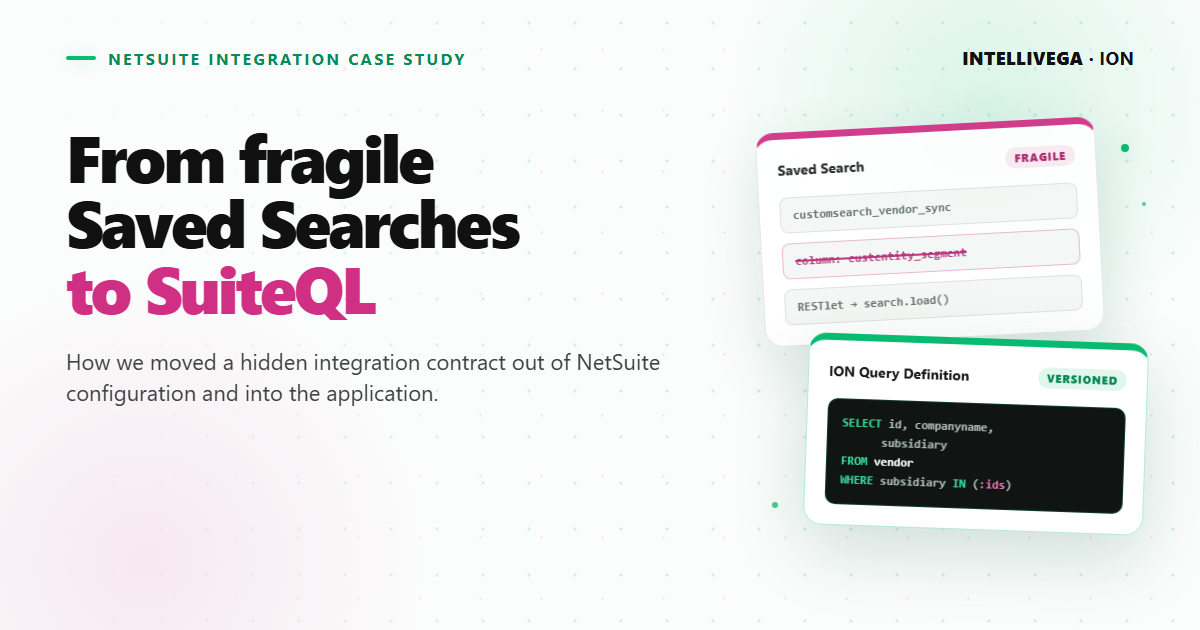
We knew we had outgrown NetSuite saved searches when a harmless configuration change could break ION without anyone touching the application. A key part of the integration lived outside our code, in saved searches configured separately in each customer's account. ION called those searches by ID and expected their filters, columns, and results to stay consistent.
The problem became harder to manage as we onboarded more organizations to ION. A mistyped saved search ID or a missing column could surface as an application bug, and tracking it down meant comparing our code with configuration buried in a customer's NetSuite account.
ION—Integrated Oilfield Networks—is an ASP.NET Core accounts payable and accounts receivable platform for oilfield service companies. It processes bills and field tickets, posts the resulting transactions to each company's ERP platform, and synchronizes the NetSuite data needed along the way: customers, vendors, items, accounts, transactions, segments, employees, and approval assignments.
The original integration retrieved that data through saved searches and a RESTlet. It worked, but it became harder to configure, change, and support as ION grew across organizations with different NetSuite accounts and requirements.
We moved the query definitions into ION with SuiteQL. Then we added organization-specific overrides, a query playground, a gradual migration path, and an end-to-end sanity test. We could now change, test, and diagnose the integration through the application instead of relying on fragile per-account configuration.
The original integration
The first version of the integration was straightforward:
ION
  → calls a RESTlet with a saved search ID
  → the RESTlet loads and runs the search
  → NetSuite returns the rows
  → ION converts those rows into its own data models
The RESTlet itself was generic. ION supplied a search ID, and the script loaded that search with NetSuite's N/search module, retrieved the results in batches, and returned them.
That kept the SuiteScript simple, but it left the data contract inside each NetSuite account's UI, separate from the application code that consumed it.
Why the saved searches became a problem
Every new organization needed its own set of saved searches. Someone had to create them, give them the expected IDs, configure the right columns and filters, and verify that their results matched what ION expected.
We could not simply copy identical searches. NetSuite accounts differed in their subsidiaries, custom segments, fields, and business rules, so some organizations needed account-specific changes.
Once an organization was live, even a small update became risky.
ION expected a specific result shape. Removing a column, changing its ID, or returning a different value could break deserialization or produce incomplete synchronization data. A NetSuite administrator might reasonably edit a saved search without realizing that an external application depended on it.
We also had a versioning problem. If a new release of ION required a different result shape, editing the existing search could break the current application version. The safer option was to create another saved search and coordinate its ID with the new release.
Over time, this created several recurring costs:
- Onboarding required repetitive account setup and verification.
- The integration logic was split between application code and NetSuite UI configuration.
- A saved search could change without a code review or application deployment.
- Supporting multiple application versions required more searches and IDs.
- Diagnosing an incident meant checking both the application and manually configured searches in the affected account.
Saved searches were not the problem in every context. They remained useful for reporting and straightforward account-managed requirements. They were a poor source of truth for this application-owned, multi-account integration contract.
Moving the integration contract into ION
SuiteQL gave us a better boundary. It is NetSuite's SQL-based query language for the analytics data source and supports advanced queries through SuiteScript and SuiteTalk REST web services.
Instead of treating a saved search ID as the definition of a sync, ION now kept the query text, required parameters, and expected result model together.
ION
  → starts a synchronization operation
  → selects the ION default query or an organization override
  → applies organization-specific parameters
  → runs the SuiteQL query in the connected NetSuite account
  → maps the returned rows to ION's data model
Keeping the default queries in the application gave us standard software-development controls: version history, code review, repeatable testing, and coordinated releases. A change to the vendor sync now traveled with the application code that consumed its result.
That solved only the default case, however. Our customers still had legitimate differences.
Preserving account-specific behavior
We did not want centralization to mean hard-coding one query for every NetSuite account.
Each synchronization operation received an ION default. An organization could store an override when its account required different logic. Queries also supported parameters supplied by ION, such as the subsidiaries available to that organization.
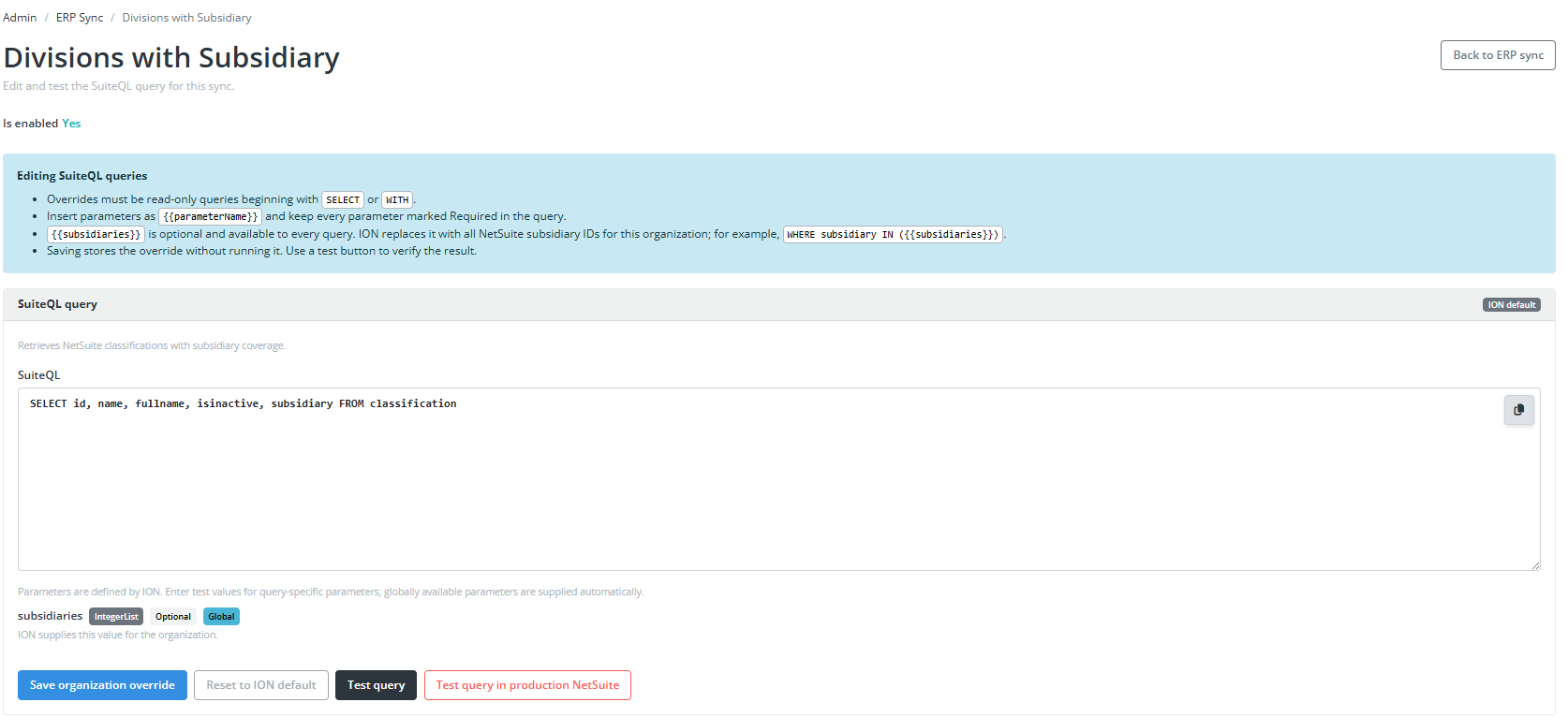
The administration page showed whether a sync used the ION default. From the same page, an administrator could inspect its parameters, test the query, save an organization override, or reset it to the default.
This gave us a useful ownership model:
- ION owned and improved the standard integration.
- Account-specific exceptions remained possible.
- Overrides were explicit instead of being indistinguishable copies of saved searches.
Building a SuiteQL playground
Writing a query was only part of the work. Developers also needed a fast way to understand an unfamiliar NetSuite account and verify a query against real data.
We added a SuiteQL playground to ION's ERP administration tools.
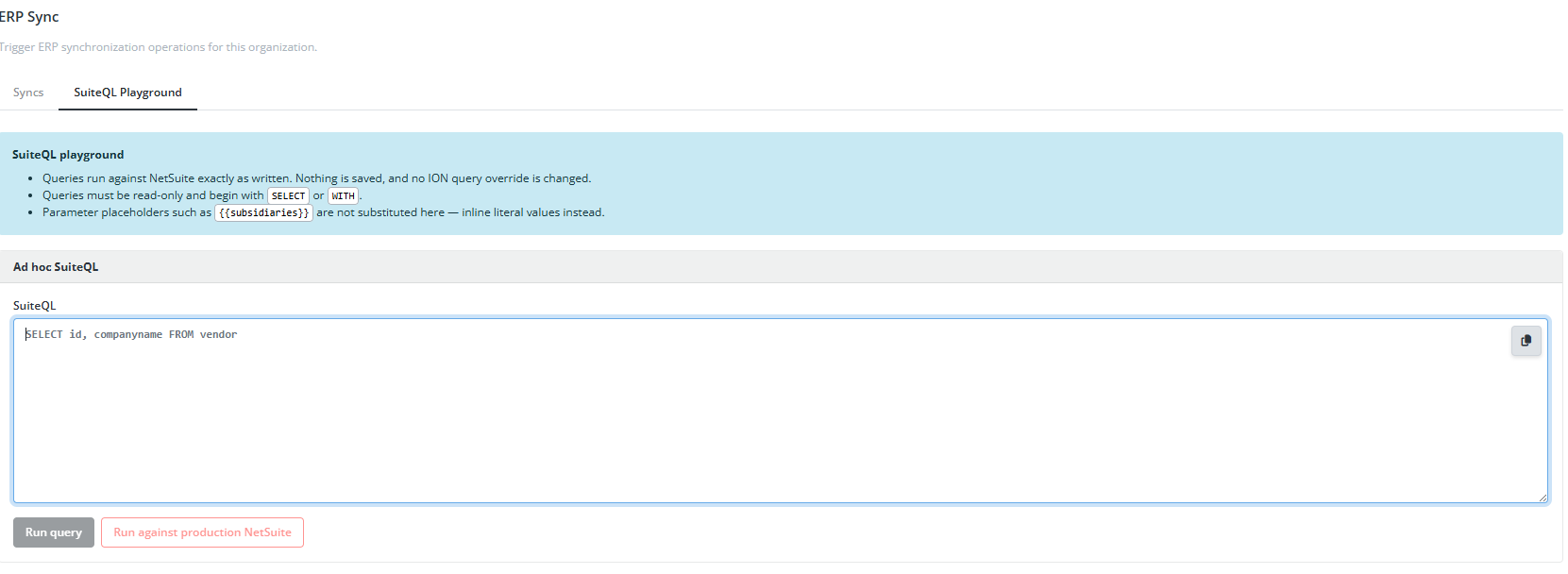
The playground ran an ad hoc query against the connected NetSuite environment without saving it or changing an existing sync definition. It made exploring record and field behavior much faster than editing a saved search, changing an integration ID, and running a full synchronization to inspect the result.
The UI let developers run a query against sandbox and, when necessary, explicitly test it against production. This shortened the feedback loop during onboarding and incident response. A developer could reproduce a data question, refine the query, and inspect the raw response from the same application responsible for consuming it without having to manage credentials in another API browsing application like Postman.
Migrating without a big-bang cutover
Replacing every saved search at once would have traded one operational risk for another. We needed to prove that the new implementation returned data ION could actually use.
During the migration, ION ran both implementations:
Existing saved search ─┐
                       ├─ compare results and application behavior
New SuiteQL query ─────┘
The runtime toggle served two purposes. First, it let us compare the saved-search and SuiteQL results for the same organization. Second, it preserved an emergency fallback while we verified the new queries in production use.
This was especially important because equal row counts alone do not prove that two implementations behave the same. We also needed to know whether the returned fields could be converted into the models and values expected by ION.
Testing the entire integration boundary
We added a NetSuite sanity test that ran the configured saved searches and SuiteQL queries against the connected account.
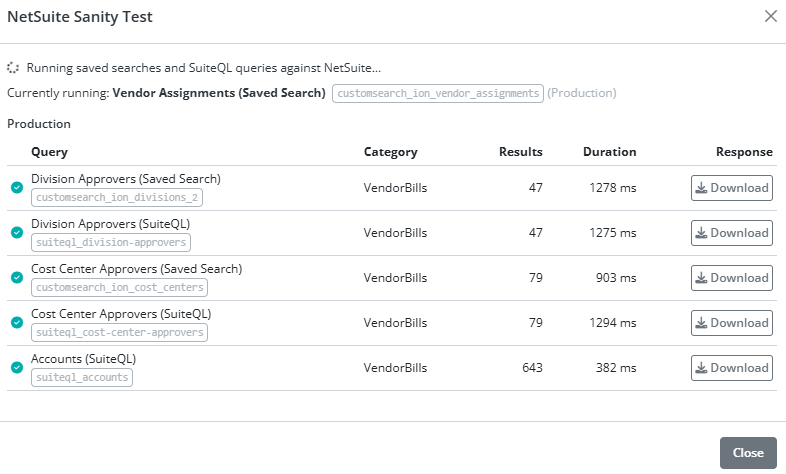
For each integration definition, the test showed its category, result count, duration, and downloadable response. During migration, paired entries made it easy to compare the saved-search and SuiteQL versions of operations such as division and cost-center approver synchronization.
The sanity test gave us one place to answer three questions:
- Can ION reach this NetSuite account?
- Does every configured query or search run successfully?
- Can ION understand the response it receives?
We could run it while onboarding an organization, after changing a query, or during an incident. Instead of waiting for a scheduled synchronization to expose a problem, we could test the boundary directly and download the relevant response for investigation.
What changed
The result was not merely fewer saved searches. The default query definitions moved from manually maintained NetSuite configuration into ION without removing account-specific flexibility.
| Concern | Before | After |
|---|---|---|
| Default query definition | Manually configured in each NetSuite account | Defined in ION and released with it |
| Account differences | Customized copies of saved searches | Explicit parameters and organization overrides |
| Application release | New search IDs coordinated with new result models | Query changes released with the code that consumes them |
| Development and diagnosis | Edit a search, run a sync, and inspect the response | Test read-only queries directly in the playground |
| Migration safety | Create new search IDs and coordinate the cutover | Compare both implementations and retain a fallback |
| Integration health | Verify searches and responses manually | Run one sanity test |
In practical terms, this meant:
- Faster onboarding for new organizations
- Faster development of new NetSuite synchronization features
- Fewer failures caused by uncoordinated saved-search edits
- Quicker incident diagnosis against sandbox or production data
- A clearer path for testing and releasing integration changes
The most meaningful result was operational: manually maintained saved searches were no longer the hidden contract between ION and each customer's NetSuite account.
Lessons for other NetSuite integrations
The most reusable lesson is not simply “use SuiteQL.” It is to treat every NetSuite data extraction as an integration contract.
That contract should define:
- The query or search being executed
- The account-specific parameters and exceptions
- The shape the consuming application expects
- A safe way to test against real environments
- A migration and fallback strategy
- An end-to-end health check that includes deserialization
SuiteQL made the queries easier to keep with our application, but the surrounding controls made the migration successful. Replacing saved searches without adding overrides, testing tools, and runtime verification would have left several of the original support problems intact.
If a custom application depends on NetSuite saved searches that must never be edited, that is a warning sign. The integration may work today, but its most important contracts are living outside the system that consumes them.
References
- Oracle NetSuite, SuiteQL
- Oracle NetSuite, SuiteQL in the N/query Module
- Oracle NetSuite, Executing SuiteQL Queries Through REST Web Services
- Oracle NetSuite, SuiteQL Limitations and Exceptions