Coolify’s Clone Resource copies configuration and storage definitions, but it leaves the actual data behind. Moving resources between Coolify servers also comes with the hassle of moving that data yourself and making sure that your domain name sends users to the correct server even if their browser sends them to the cached record's IP address for the server.
This guide documents how we've moved our resources between servers with minimal downtime and without needing to wait on DNS record changes to propagate to client systems. It also covers the routing, health checks, and rollback decisions needed to test the destination, plan downtime, and preserve changes made around cutover.
1. Record what each application depends on
A connection string identifies a database, but it does not tell you which other services write to it. An integration may also depend on an allowed IP address or callback URL that changes during the move. Those dependencies need their own checks.
Start with a short inventory for each application:
| Part of the application | What to record |
|---|---|
| Deployment configuration | Repository or image, build and startup settings, domains, ports, secrets, and required server access |
| Application readiness | Health-check source, endpoint or command, internal port, required tools, and startup timing |
| Persistent data | Databases, uploaded files, generated documents, and the volumes or directories holding them |
| Background work | Scheduled tasks, queue workers, imports, notifications, and anything that can change data without a user request |
| External dependencies | Storage services, email, authentication providers, webhooks, and integrations |
A Docker volume stores data outside the container’s lifecycle. Replacing the container can preserve that data on the same host, but deploying a container on another host does not bring the existing volume contents with it.
For each dependency, name the person responsible for checking it. This gives the cutover a specific set of tests rather than leaving someone to discover a missing integration after users return.
2. Prepare the destination without starting duplicate work
A working SSH connection only proves that the transfer account can reach the server. The destination still needs access to the repository or image registry, databases, and external services. The public proxy also needs to reach the application’s intended entry point. Check the required ports and firewall rules from the machines that will actually use each connection, and confirm the destination has enough capacity.
The resource-operation names can also be misleading when the goal is to move to another server:
- Clone Resource creates a separate, stopped application on a selected server and network within the same Coolify instance. It copies configuration, including storage definitions and scheduled tasks, but leaves stored data behind.
- Move Resource changes the existing application’s project and environment. It does not move the application to another server.
If the destination belongs to a separate Coolify instance, recreate the application there using the recorded settings. Instance-level access and integrations also need to be configured.
Copied settings need review before the first deployment. A database URL can still point to production, a shared-variable reference may be missing, and a host path may exist only on the source. Check secrets and dependency addresses, give the destination a temporary hostname, and use test dependencies where practical. Keep scheduled tasks and background workers disabled until they are deliberately tested or enabled at cutover.
Two copies of an application can send two sets of emails, import the same records twice, or process the same queue. Decide which instance owns that work throughout the transition.
3. Transfer persistent data and test the restore
Storage is one of the easiest places to mistake a successful deployment for a successful move. A mount can be configured correctly while the volume behind it is empty.
For a database, use the database engine’s supported backup and restore process. A file copy of a running database volume can be inconsistent even when the transfer completes without an error.
For ordinary files in a Docker volume, an archive can be extracted into a destination volume. Match the source data to the actual destination volume name and its container mount path. Restoring into a different volume leaves the application looking at empty storage. For a bind-mounted directory, check both the host path and the path visible inside the container.
After the restore, verify ownership and permissions. Then open representative records and files through the application. A directory full of restored uploads is useful only if the application can find and read them.
A rehearsal copy lets the team test the procedure and estimate the maintenance window. It also becomes stale as soon as the source accepts more changes. Before the final copy, stop all writers to the source data, including workers and integrations. Keep destination writers stopped during the restore too. If downtime must be shorter than a full copy allows, the plan needs a tested synchronization or replication method.
The business decision here is concrete: how long can users wait, and can the transfer and validation fit within that window?
4. Test how traffic reaches the destination
Changing a DNS record does not fix a missing proxy route or the wrong internal port. A request must reach the correct server, match the intended domain, and be forwarded to the application’s listening port. Coolify uses Traefik as its default reverse proxy and generates routes from configured domains and container ports.
One option during a migration is to keep the existing public entry point and forward requests from there to the destination server:
User request
    → existing public proxy
    → destination server proxy
    → application container
With Traefik and application health checks enabled, the destination proxy must also consider the application healthy. Forwarding traffic to that server cannot bypass its health-based routing decision; validate this final hop before switching the public route.
This separates the application cutover from a public DNS change. It also keeps the old ingress server in the request path, so that server remains a dependency until the ingress is moved or retained intentionally.
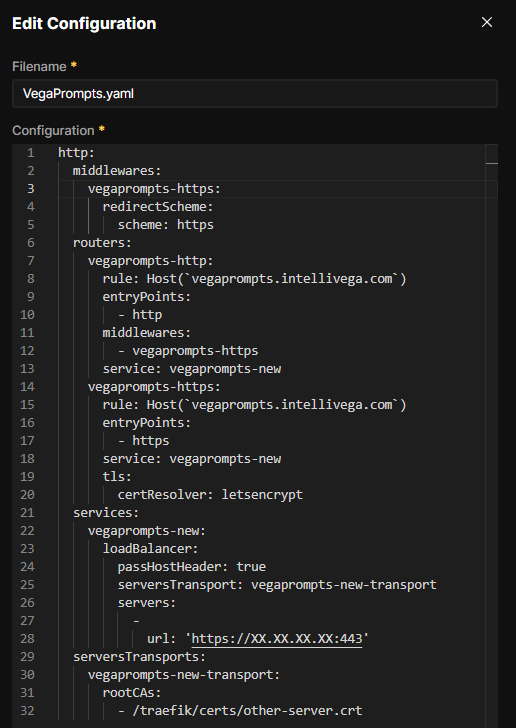
For custom routes, Coolify provides Servers > your server > Proxy > Dynamic Configurations. These files live under /data/coolify/proxy/dynamic/ on the host. Traefik watches them for changes. Leave Coolify-generated routing files under Coolify’s control.
When forwarding through a second proxy, verify that the original HTTP Host header reaches it so it can select the intended application. Also confirm that the upstream address reaches the destination directly and cannot route back to the original proxy.
If DNS will change instead, plan for cached records and a period when requests may still reach the old address. Both routes must respect the same decision about where writes are allowed.
5. Verify certificate trust between the proxies
The public domain can have a valid certificate while the connection between the two proxies still fails. When the public proxy connects to the destination over HTTPS, it acts as a TLS client. It must trust the destination certificate and verify the hostname used for that connection.
Traefik’s ServersTransport configuration controls this connection. Its rootCAs setting supplies trusted certificate authorities, and serverName sets the server name used for TLS SNI. Keep certificate verification enabled; insecureSkipVerify disables certificate-chain and hostname checks.
The HTTP Host header and the TLS server name serve different purposes. The first selects the application route. The second identifies the server during the TLS handshake. Both need to match the intended path.
There is also a distinction between presenting a certificate to incoming clients and trusting a certificate on an outgoing connection. Adding a custom server certificate does not configure upstream trust.
Coolify mounts /data/coolify/proxy/ on the host at /traefik/ inside the proxy container. A certificate stored in the host’s certs directory therefore uses a /traefik/certs/ path when referenced inside Traefik.
Check the certificate chain, hostname, and expiration, then inspect the proxy logs. Resolve trust failures before moving traffic.
6. Test the application through the intended route
A container can be running while users cannot reach it. Even a passing health check only verifies what that check actually tests; it may say nothing about login, file access, or an external integration.
Make health checks a cutover gate
When Coolify uses Traefik and application health checks are enabled, unhealthy containers are removed from routing. If none remain healthy, users can see “No available server” (503) or 404 rather than the application. A running process alone is therefore insufficient evidence that the moved application can receive traffic.
Before cutover:
- Identify the active check: Coolify configuration, Dockerfile
HEALTHCHECK, or a per-service Compose check. Test the actual command inside the destination container. - For HTTP checks, confirm the scheme, host, internal listening port, and endpoint. Check the response and command exit status; do not assume that a dashboard field guarantees the desired validation. Ensure required tools such as
curlorwgetexist in the final image. - Allow enough startup time for initialization. Review the start period, timeout, interval, and retries; investigate missing configuration or unavailable dependencies rather than hiding persistent failures with longer waits.
- Confirm that the destination becomes healthy and stays healthy during testing. Inspect container status, application logs, and proxy logs, then test through the intended hostname.
Keep traffic on the source until these checks pass. Fix the failed check or underlying application problem instead of disabling health checks to make the cutover appear successful. In a two-proxy migration, test both the destination route and the complete public path.
Then test a small set of representative operations:
- Sign in and complete any authentication callback
- Open an existing record and its associated files
- Create or update a controlled test record and confirm it persists
- Upload and download a file
- Run a controlled integration or background job and check its result
- Inspect application and proxy logs for the same requests
Use safe test data and prevent test notifications or transactions from reaching real recipients unintentionally. Repeat hostname-dependent checks through the production route during cutover.
If a request returns 503 or another error, identify which proxy or application produced it. Check reachability, TLS, routing, and container health separately. The status code alone does not establish the cause.
7. Plan rollback around the latest data
Keep the source configuration, storage, and backups available for an agreed rollback period. At cutover, stop its writers, finish the final transfer, verify the destination, and move traffic. Enable each scheduled task or worker in one place.
If the destination has accepted new records or uploads, the source may already be out of date. Before returning users to it, stop destination writes and reconcile those changes. Coolify’s migration guidance explicitly includes this step before restoring the original route.
Write down the rollback trigger, who makes the decision, and how the latest data will be preserved. A failed login might justify an immediate rollback; a minor display issue might be safer to fix in place. The team should agree on that distinction before an outage forces the decision.
What to confirm before approving the cutover
A business owner does not need to review every proxy setting. Ask for specific answers:
- What benefit justifies the migration?
- Which functions will be unavailable, and for how long?
- Has the team restored the data, confirmed passing destination health checks, and tested a critical user workflow through the intended proxy route?
- Who owns scheduled jobs and incoming integrations during the switch?
- What would trigger rollback, and how would recent transactions be preserved?
- Who is watching the application and making the go/no-go decision?
After cutover, confirm that backups and monitoring cover the destination. Update deployment hooks, documentation, and any integrations still tied to the old server.
Record the test results and the final working configuration. Before removing the source application and its data, confirm that the rollback period has ended and that a destination backup has been restored successfully. Then remove migration-only routes and unused storage.
Sources
- Docker Docs — Volumes
- Coolify Docs — Clone or move an application
- Coolify Docs — Migrate an application
- Coolify Docs — Traefik overview
- Coolify Docs — Dynamic configuration
- Traefik Docs — ServersTransport
- Coolify Docs — Custom SSL certificates
- Coolify Docs — Health checks
- Traefik Docs — HTTP services
- Coolify Docs — No available server (503)
- Docker Docs — HEALTHCHECK